Inside HRS Exposure
From a free scan to a closed finding.
The snapshot is where it starts. The console keeps watching your domains, ranks what an attacker would use first, and proves each fix with a re-scan.
Watch the 2-minute demoSpoofable email, look-alike domains, leaked credentials and exposed executives, read from public sources in about 30 seconds.
A Cloudflare human check runs in the background and only asks for a click when it has to.
Free · No sign-up · Public sources only · Watch the 2-minute demo
About 30 seconds. Every check reads public sources only, and each one appears here as it finishes.
Reading DNS, mail authentication, look-alikes, certificates and breach signals…
Some checks did not complete or could not be assessed, so this grade is an upper bound. The full report re-runs them.
Ranked by what an attacker would use first. Each says what to change, in your own DNS or accounts. The full report names the exact accounts, people and hosts.
Select a stage to see what it is, and what breaks it.
It names the people and accounts behind each finding, so we only send it to an address at the domain you scanned.
One email with a private link to the report. See our privacy notice.
New look-alikes get registered and new leaks surface. HRS Exposure re-scans on a schedule, alerts on change and proves each fix with a re-scan.
The snapshot is where it starts. The console keeps watching your domains, ranks what an attacker would use first, and proves each fix with a re-scan.
Watch the 2-minute demoThe full report names the people and accounts behind each finding, so it only goes to an address at the domain you scanned.
Every claimed fix is checked by the next scan. One that does not hold is reopened, not quietly closed.
See the whole loop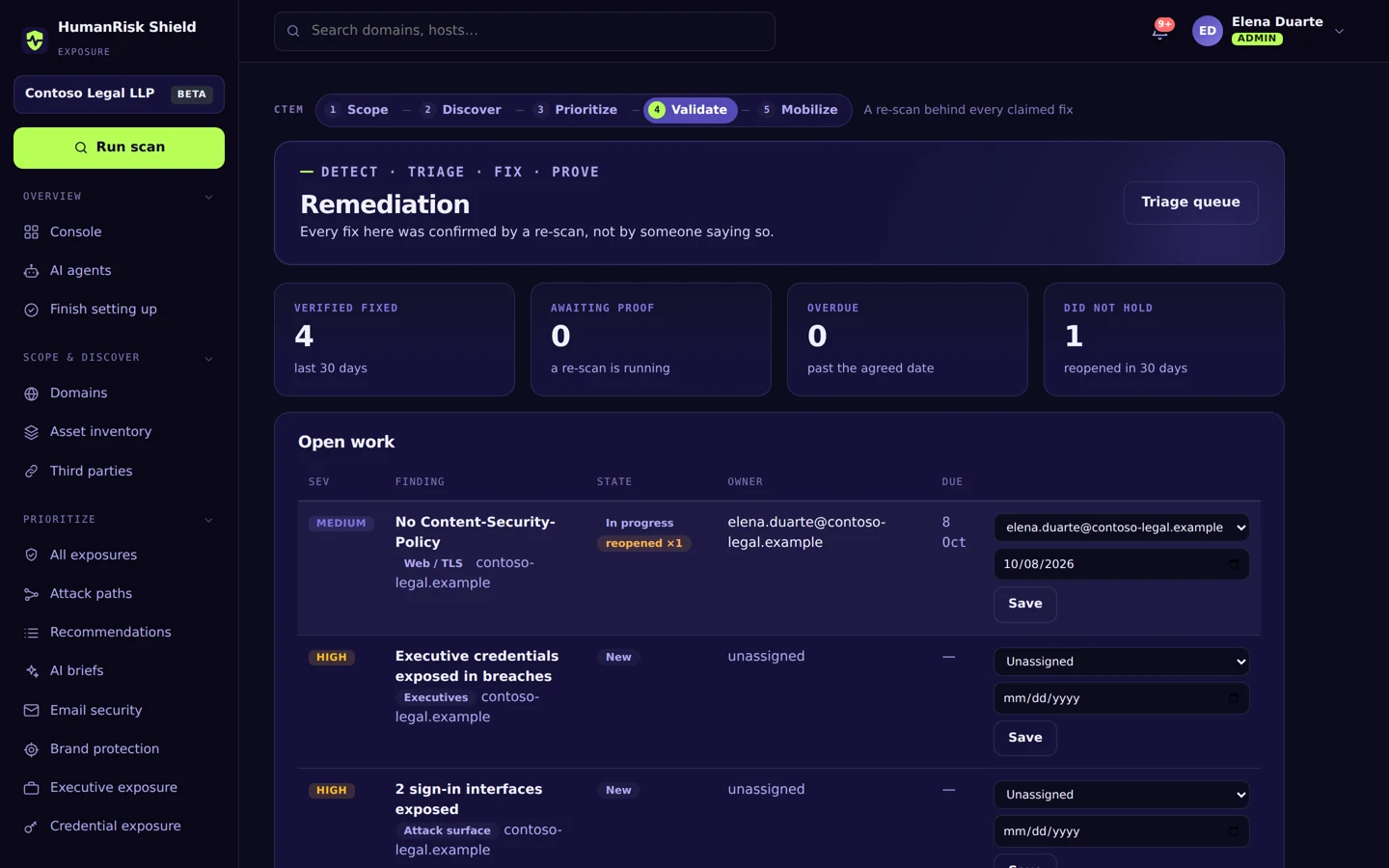
No account, no agent, nothing installed. We read what anyone on the internet can already see.
Your company domain, or your work email and we take the domain from it.
DNS, certificate logs, your public pages and breach data. You watch each one finish. Nothing touches your systems.
A grade, what to fix first and how, and the full report at an inbox on your domain.
Your people, your brand and your organization. Each check is a route in that starts with public information, and each result says how to close it.
Leaders named on your public pages, and whether their accounts show up in leaks. The target list for CEO fraud.
Accounts on your domain in breach data and infostealer logs, with the fresh ones ranked first.
Whether mail can be forged as your domain: SPF, DKIM and DMARC as published. The start of most invoice fraud.
Registered near-copies of your name, and which of them can already send or receive mail.
VPN portals, webmail and admin logins anyone can find under your domain. Where a stolen password gets typed.
Who runs your DNS, who may send mail as you, and who sees your mail flow, read from public records.
Certificate health and the security headers a modern site is expected to send.
A free scan, the console, AI agents proposing the fix, and a re-scan that proves it, in the real product on a demo company.
The free snapshot is stage two of five. Inside HRS Exposure every stage runs on its own: agents work out what matters, it acts where you allow it, and a re-scan proves each fix instead of assuming it.
Your verified domains, re-proved every month, weighted by what each is worth to the business, with out-of-scope hosts set aside.
Subdomains from certificate logs and where they are hosted, your other domains, look-alikes, third parties and identity posture.
The snapshot is hereOne severity scale across every check, ranked by CISA KEV and EPSS exploit intelligence, attack paths and what the asset is worth.
A re-scan behind every claimed fix, run automatically when an agent spots one if you allow it, accepted risks that expire, and captured evidence for look-alike domains.
Tickets in Jira, ServiceNow, GitHub or ConnectWise; SIEM, Slack and Teams alerts, overdue escalations; registrar takedown requests.
The full report names the people and accounts behind each finding, so it is only ever sent to an address at the domain you scanned.
| What you get | Free snapshot | Full report | HRS Exposure |
|---|---|---|---|
| Grade, score and every check's status | Included | Included | Included |
| What to fix first, and how | Included | Included | Included |
| Every finding, with its evidence | Not included | Included | Included |
| The people and accounts behind each finding | Not included | Included | Included |
| Where you get it | This page | An inbox at your domain | Your console |
| Continuous monitoring and change alerts | Not included | Not included | Included |
| Human Risk attribution | Not included | Not included | Included |
| Remediation workflows, proved by re-scan | Not included | Not included | Included |
| Exploit intelligence (CISA KEV, EPSS) | Not included | Not included | Included |
| Ticket sync (Jira, ServiceNow, GitHub) | Not included | Not included | Included |
| Registrar takedown requests | Not included | Not included | Included |
| MSP multi-tenant dashboards | Not included | Not included | Included |
Then fix the first things before anyone uses them, and keep watching with HRS Exposure.